Core Features
Everything you need in a desktop email client.
Multiple Account Support
Manage all your emails in one place.
All your email accounts — Gmail, Outlook, Yahoo, iCloud — have a home in Thunderbird. Manage accounts separately or in a unified inbox. A powerful alternative to Outlook that gives you full control, for free.

Ad Free Experience
Free without strings attached.
We do not make money by reading your email. We do not clutter your inbox with ads. Enjoy a clean interface free from commercials and data mining — unlike many browser-based email clients.
Read Our Privacy PolicyCross Platform Support
One email client, every operating system.
Download Thunderbird once and use it on Windows 10, Windows 11, macOS, or Linux. Switch operating systems any time without losing your email history or settings. The same free client, everywhere.
See All Available Versions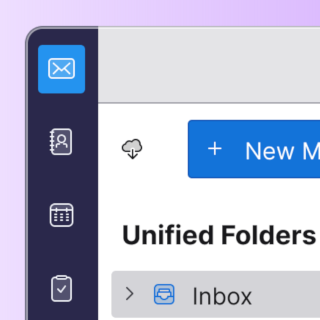
Calendar, Contacts, and Tasks
Because email is just one part of being productive.
Thunderbird includes a built-in calendar, contacts manager, and task list. Sync with Google Calendar, Microsoft Exchange, and CalDAV providers — all inside your free email client. It's all there the moment you download Thunderbird, no extra apps needed.
Better Security and Privacy
Be safe and in charge by default.
Thunderbird is open source — its code has been publicly reviewed and improved for over 20 years. End-to-end encryption via OpenPGP and S/MIME is built in. Your email stays private by default. When you download Thunderbird, security isn't a setting you have to find — it's on from day one.
View the Source Code
Always Free and Open
Thunderbird is a gift from people like you.
Thousands have contributed time and money to make Thunderbird possible. Its code is open source and freely licensed to use, modify, and share. When you download Thunderbird, you get software built by and for its users — not a product designed to monetize your inbox.
Learn Our MissionThird-Party Ecosystem
Extend Thunderbird with hundreds of free add-ons.
Thunderbird supports a rich ecosystem of extensions — calendar sync, encryption tools, themes, productivity add-ons, and more. Unlike web-based email clients, you are always in control of what gets added.
Explore Thunderbird Add-Ons
Helpful Resources
Level up your Thunderbird Skills.
New to Thunderbird?
Set up your first email account in minutes. Thunderbird auto-detects settings for Gmail, Outlook, Yahoo, iCloud and most IMAP/POP3 providers. No manual configuration needed.
Beginner's Guide →Switching from Outlook?
Thunderbird is the most popular free alternative to Microsoft Outlook. Import your existing emails, contacts and calendar data in a few clicks — no data loss.
Thunderbird vs Outlook →Ready to Download?
Download Thunderbird for Windows 10, Windows 11, macOS 10.12+ or Linux. Free, no registration, no credit card. Version 148.0 — updated monthly.
Download Thunderbird Free →Common Questions
Is Thunderbird a good replacement for Microsoft Outlook?
Yes. Thunderbird handles email, calendar, contacts and tasks — just like Outlook. It supports Exchange accounts via add-ons and connects to Gmail, Yahoo, iCloud and any IMAP server. Unlike Outlook, it's free to download and use, with no Microsoft 365 subscription required.
Does Thunderbird work on Windows 10 and Windows 11?
Yes. Thunderbird fully supports Windows 10 and Windows 11, both 32-bit and 64-bit. It's one of the best free email clients available for Windows — with no Microsoft account required.
What email providers does Thunderbird support?
Thunderbird works with Gmail, Outlook.com, Yahoo Mail, iCloud, ProtonMail, Fastmail, and any provider that supports IMAP or POP3. It auto-configures account settings for all major providers.
How often is Thunderbird updated?
Thunderbird releases a new version monthly with features and security fixes. The current version is 148.0. Updates are free and install automatically in the background.